Gmail的几个Greasemonkey User Scripts

via userscripts.org ,找到了几个Greasemonkey的Gmail的scripts,觉得挺好用,就写下来与您分享,当然你需要Firefox浏览器,安装Greasemonkey的扩展插件,还有Gmail,这3个真是绝配了,哈哈。
 Gmail Delete Button 为Gmail添加随时删除邮件的button
 Gmail Mark Read Button 为Gmail添加标记以读邮件的button
 Bloglines 在gmail里加入bloglines的my feeds
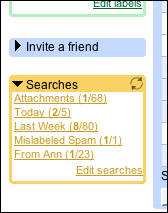 Adding Persistent Searches to Gmail 左侧添加固定搜索box的js,可以自定义,好像是通过lable来搜索的
Technorati Tags: Gmail,Greasemonkey, scritps, firefox
posted by songzhen @ 9:28 上午
|